This article was last updated on:
Welcome to Involve Asia and congratulations on becoming an Involve Publisher!
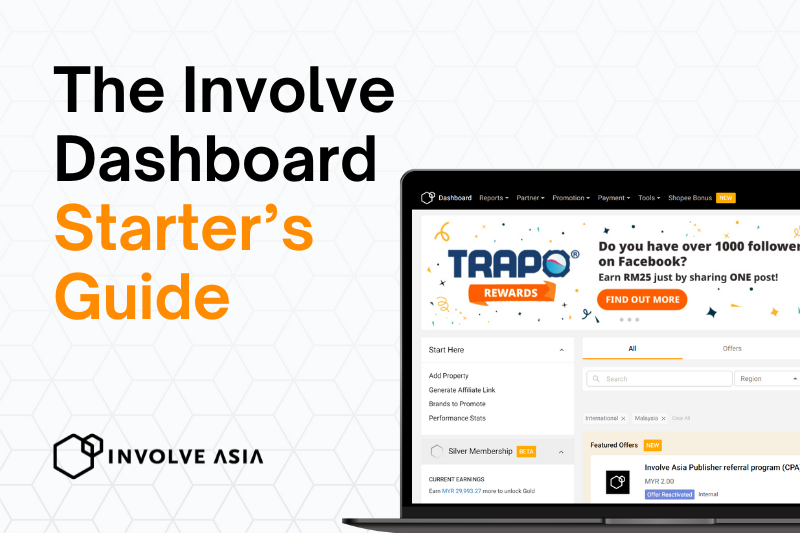
This quick guide walks you through all the essentials inside your Publisher Dashboard so you can start promoting brands, generating links, and earning commissions faster.
Key takeaways: Learn to navigate the Involve Asia dashboard step by step, find brands, apply to offers, generate affiliate links (including deeplinks), and track clicks/conversions/earnings in real time.

What Is the Dashboard?
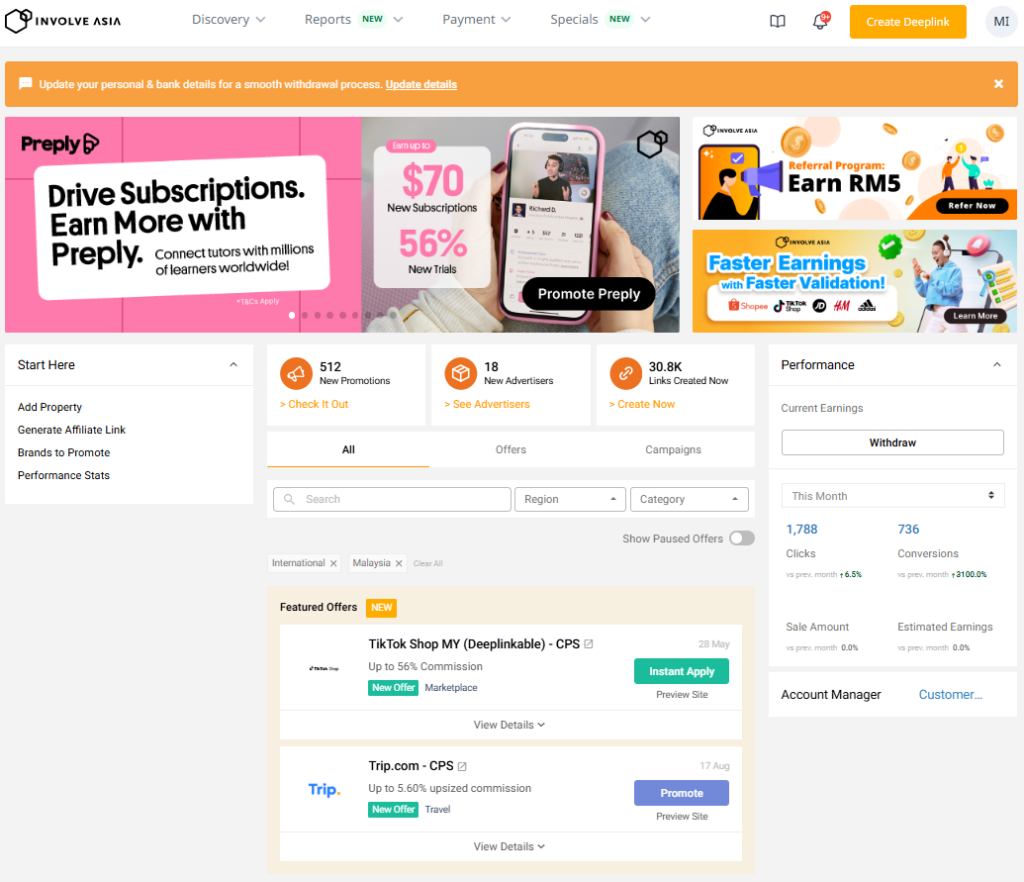
Your main workspace – discover brands, apply to offers, generate affiliate links, and track earnings, all in one place.
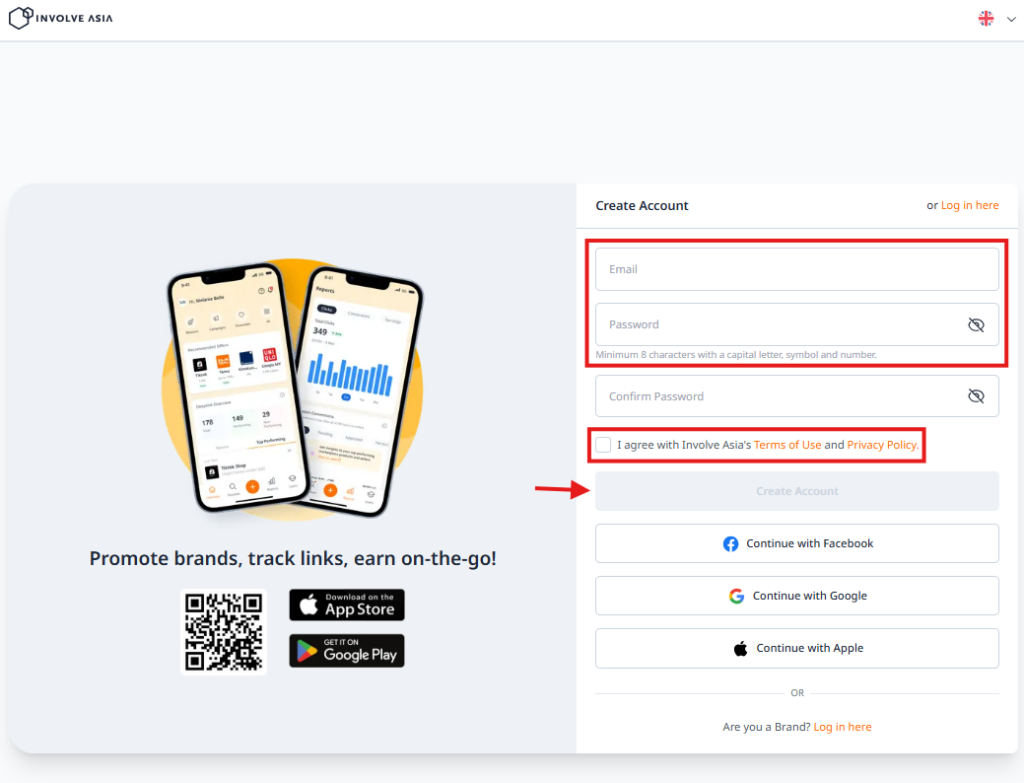
Access it: Go to Involve Asia → log in with email, Google, Facebook, or Apple → you’ll land on your affiliate dashboard homepage.
Before You Start
- Pick your main platform – TikTok, Instagram, YouTube, website/blog, or mobile app. Stick to one channel so you can stay consistent.
- Complete your property profile – brands review this when you apply, so keep it accurate and detailed.
- Know your content direction – e.g. product reviews, tutorials, or deals/promotions. This makes it easier to pick the right brands.
Why Add a Property First
A “property” is where you’ll host your affiliate links (TikTok, Instagram, website, blog, app). Brands need to see your traffic source before approving you.
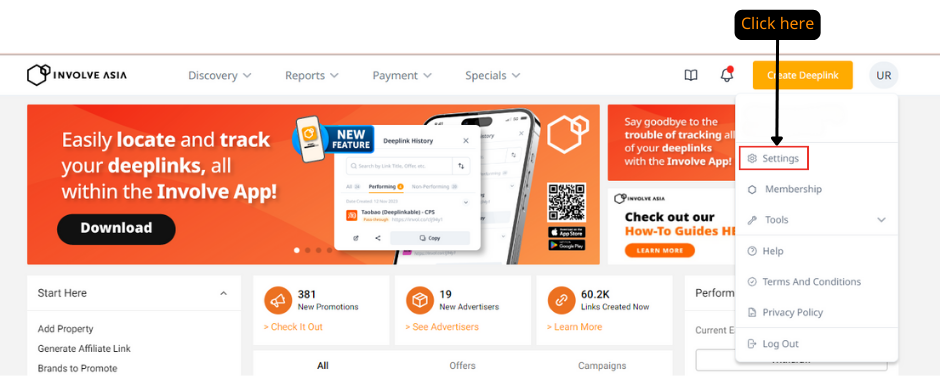
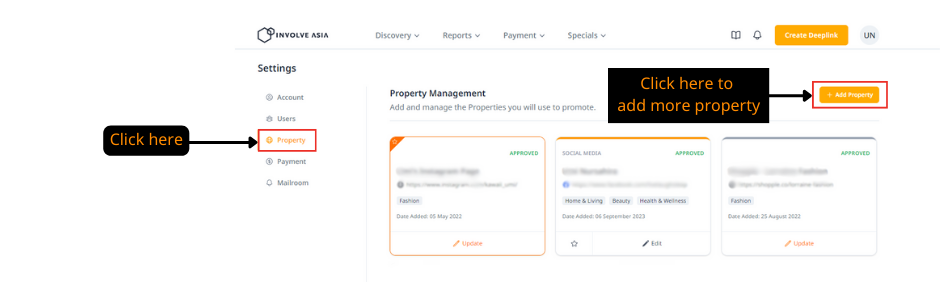
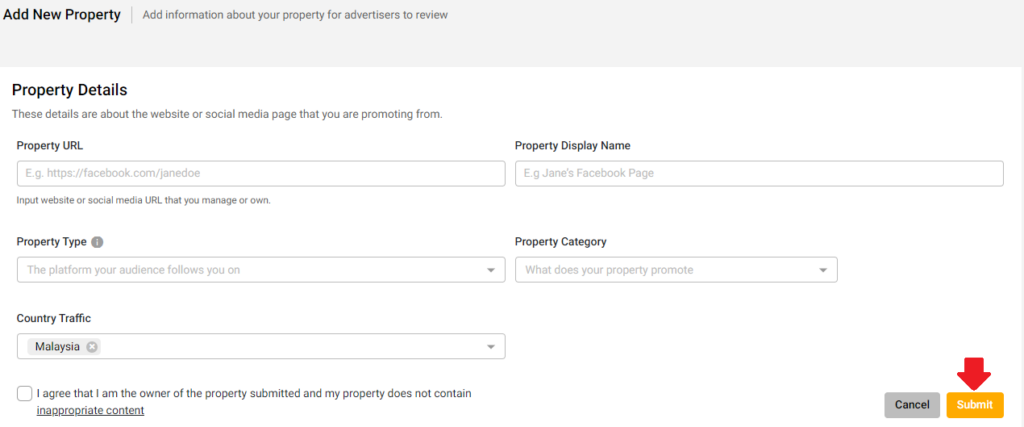
To add one: Dashboard → top-right icon → Settings → Property → Add Property → select platform type → fill in details → Submit.
- Approval takes 1–2 working days. If rejected, resubmit a property that meets requirements.
- Approval also depends on your content niche matching the brand’s audience (e.g. beauty content → beauty brands; tech content → electronics campaigns).
Rough minimum requirements by platform:
| Platform | Minimum |
|---|---|
| Facebook / Twitter / TikTok | ~50+ followers, 3 posts in the last 14 days |
| ~100+ followers, 3 posts in the last 14 days | |
| YouTube | ~50+ subscribers, 10+ videos |
| Blogs/forums/websites | Active posting in the last 30 days |
Read: How to Choose a Social Media Platform for Affiliate Marketing
Finding Brands
Brands (advertisers) are the companies partnering with Involve Asia – e-commerce (Shopee, Lazada), fashion/beauty, travel, finance, and more. Each pays commission on purchases made through your link.
As a publisher: choose brands matching your niche → promote their products → earn commission per sale.
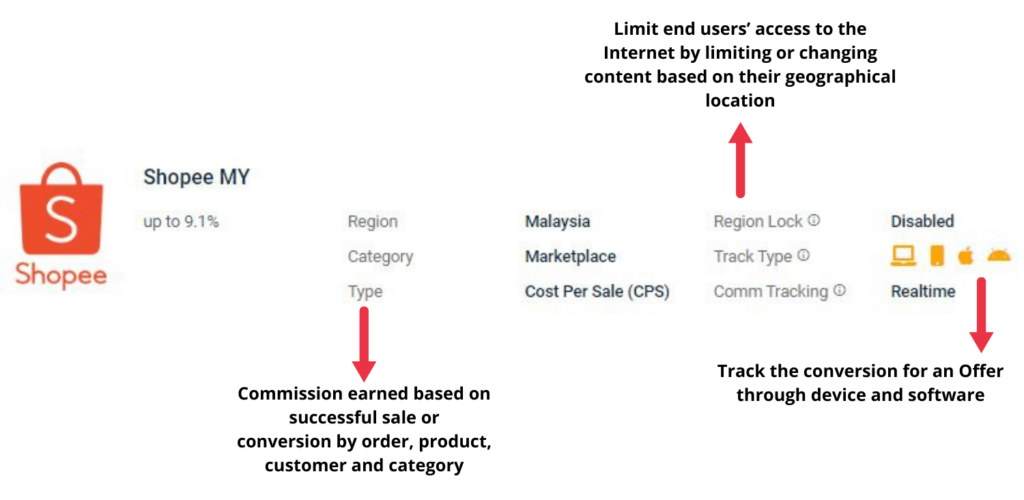
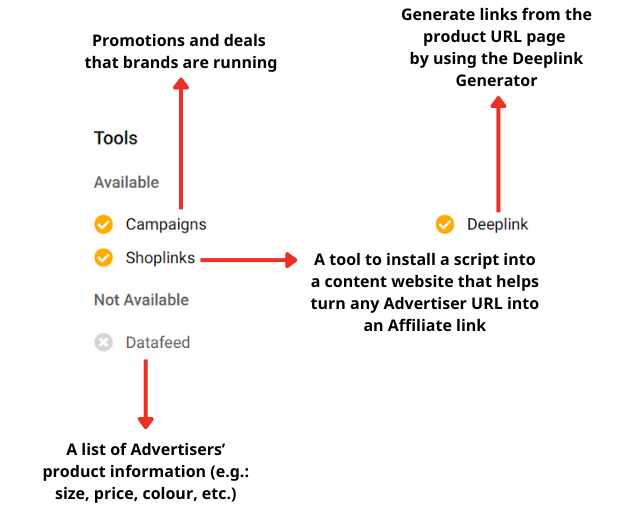
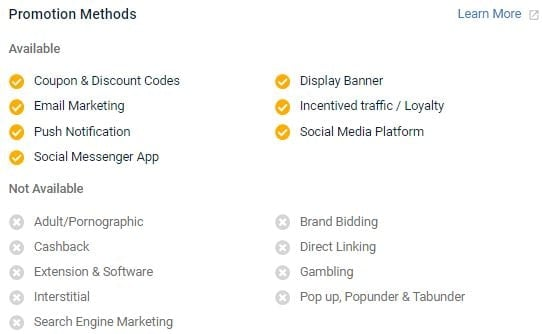
Brand requirements vary – e.g. Shopee MY’s page shows its commission structure, available tools (Campaigns, Shop Links, Deeplink Generator), and a Promotion Methods list of which channels are allowed/disallowed (search ads, social ads, email, cashback, vouchers, etc.). Breaking these rules can get your account suspended or commissions withheld – always check before promoting.
What Are Offers?
An offer is the specific program you apply to in order to get a trackable affiliate link to a brand’s site.
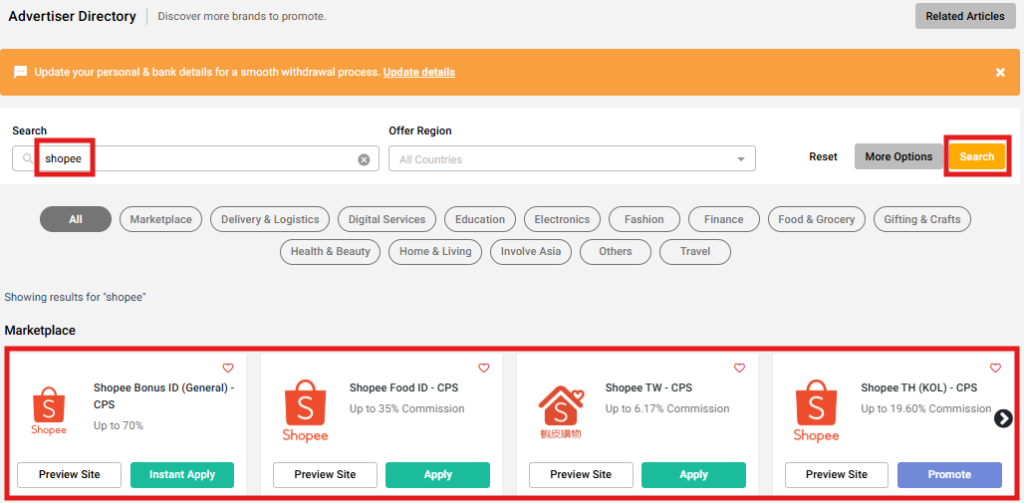
Find them: Discovery → Advertiser Directory → search by brand/category → view details → apply. You can filter by country, category, and campaign type.
Instant Apply vs. Apply:
- Instant Apply – approved immediately, generate your link right away.
- Apply – needs manual review before approval.
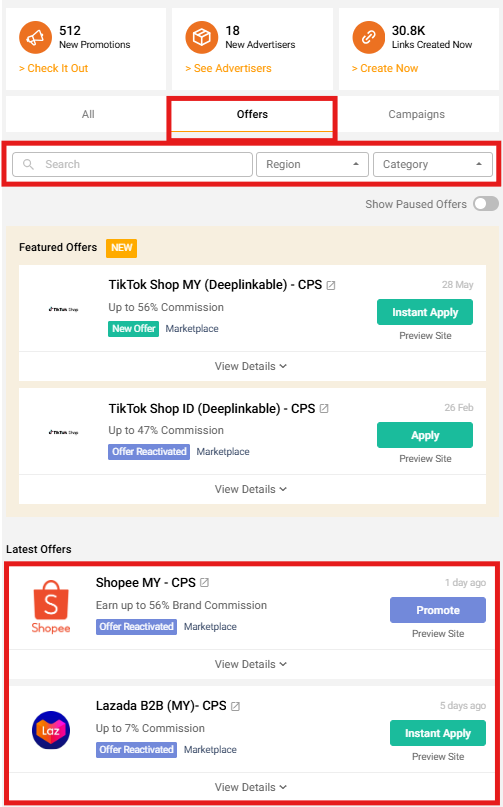
For beginners, Instant Apply offers are the fastest way to get started.
Brands vs. Offers
Not the same thing. Brand = the company (e.g. Shopee). Offer = the specific program you apply to for that brand – and one brand can have several offers (e.g. Shopee Thailand, Shopee Malaysia, Shopee KOL Campaign), each with its own commission, country, and rules. Apply to the specific offer that matches your audience.
How it works: choose a brand → apply to an offer → get approved → generate your link → promote and earn.
Generating Affiliate Links
Once approved, open the offer page and generate your link. Each offer has a unique tracking link, and you can create different links for different products or pages.
Promote the main brand page: open the offer → click Promote → copy the auto-generated link. (If you don’t see Promote, you haven’t applied yet or approval is still pending – it appears once approved.)


Promote a specific product (Deeplink): go to Create Deeplink → choose an approved offer → paste the product/landing page URL → generate your link. Deeplinks send people straight to the product page instead of the homepage – better for reviews, videos, or deal posts.

Where to Share Your Links
Anywhere your audience is active – TikTok, Instagram, YouTube, blogs, WhatsApp, Telegram. Test a few channels before committing to one at scale.
What happens next: someone clicks your link → visits the brand’s site/app → completes a purchase or required action → you earn a commission. Clicks and eligible conversions are tracked automatically in your dashboard.
Read: A Beginner’s Guide on Where to Share Your Affiliate Links
Boosting Earnings with Campaigns & Banners
Don’t just drop links passively – promote strategically.
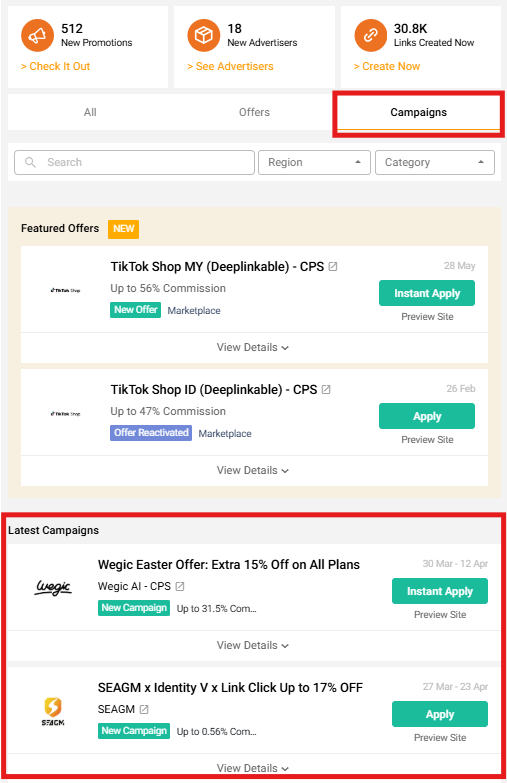
- Campaigns highlight current deals, sales, and vouchers people are already looking for. Focus on seasonal events (11.11, 12.12, etc.) and limited-time offers – conversions come faster since demand is already high.
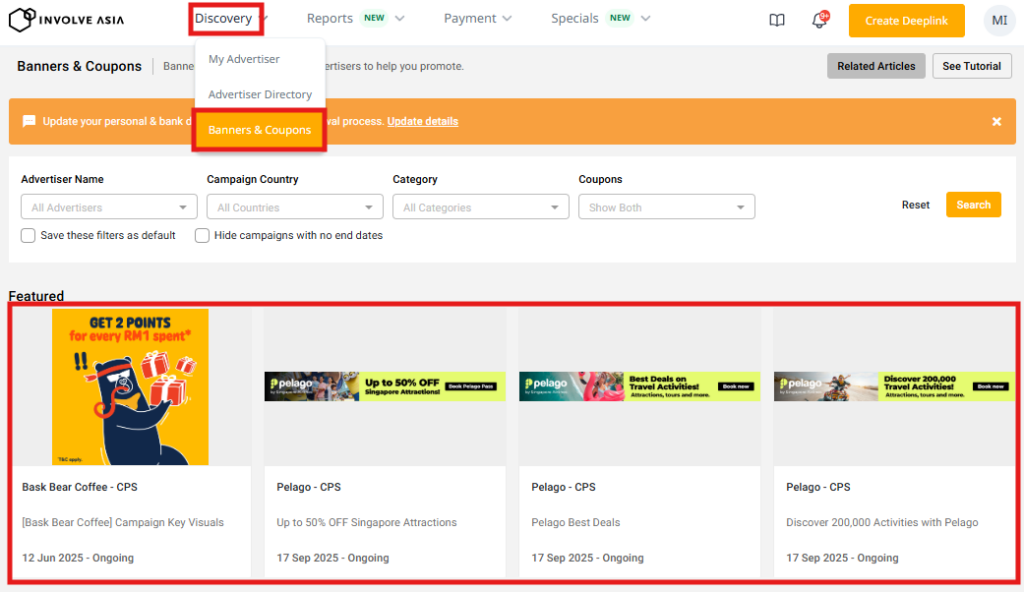
- Banners are ready-made creatives from brands. Use them on your site/blog, landing pages, or posts – they look more professional, boost click rates, and save you the work of designing your own graphics.
Find both: Discovery → Banners & Coupons → search a brand/campaign → download the banner or copy the campaign link.
Tracking Performance
Check your dashboard regularly to see what content works, which brands convert best, and where to focus.
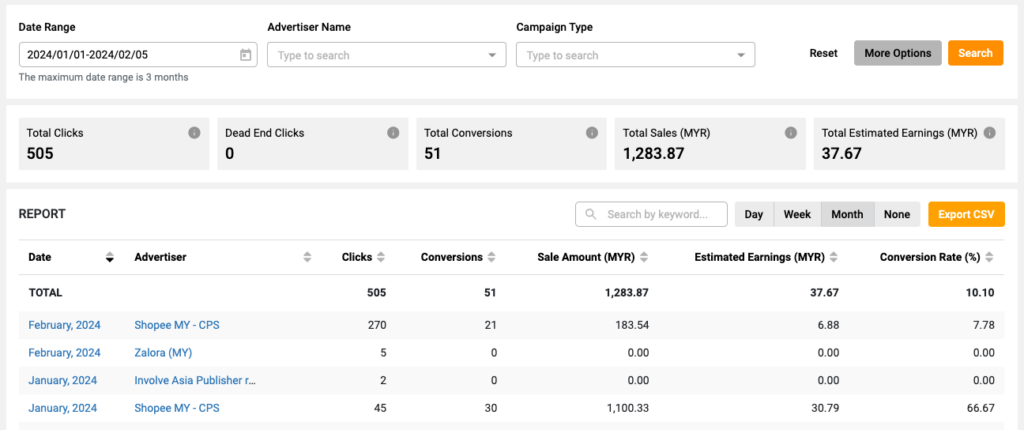
Performance Report shows: total clicks, total conversions, estimated earnings, sales amount, and performance by offer/country. Set filters, click Search, and export to CSV for your own records. (Earnings shown are estimated until conversions are fully validated.)

Conversion Report shows individual conversions: date/time, offer/brand, estimated earnings, and status (Pending, Approved, Rejected, etc.), plus a status summary of total sales and earnings.
| Performance Report | Conversion Report | |
|---|---|---|
| Purpose | Overall traffic/activity | Conversions & commissions earned |
| Key metrics | Clicks, CTR, traffic sources | Orders, conversion rate, commission |
| Detail level | High-level overview | Detailed conversion data |
| Best for | Understanding what drives traffic | Finding what generates revenue |
| Check | Daily | Regularly, to review earnings |
Getting Paid
Before payout, every conversion is validated to confirm: the order wasn’t cancelled, there’s no return/refund, and there’s no fraud or invalid activity. Once approved, the commission becomes payable and rolls into the next payment cycle. Validation and payment timing varies by advertiser (check each offer page) – validation can take longer for some brands.
Withdrawing: Payment → My Earnings Overview, where you’ll see total commissions earned, amount approved for collection, and past payout history. Click Request Withdrawal to cash out via bank transfer or PayPal. You’ll need a minimum approved balance to withdraw (looks like ~RM30 in the guide); payments then process within about 10 working days, after which status updates to “Paid” automatically.
Read: Affiliate Marketing Payment Methods for Publishers and Affiliate Partners
Conclusion
Keep it simple starting out: use Instant Apply offers, use deeplinks for specific products, focus on one platform, and check your reports weekly. These habits build momentum faster. With just a few steps you get access to thousands of brands, real-time tracking, and monthly payouts – your first commission starts with your first link.
About the Author

Frequently Asked Questions (FAQs)
How do I use the Involve Asia dashboard as a beginner?
Add your property (TikTok, website, Instagram, etc.) → find brands via the Advertiser Directory → apply to offers → once approved, click Promote to generate your link → share it and track clicks/earnings in the dashboard.
How do I generate affiliate links for an offer?
Apply (or Instant Apply) to an offer → once approved, the button changes to Promote → click it for your tracking link. Use Create Deeplink for links to specific product pages, which often perform better.
What’s the difference between offers and campaigns?
Offers are what you apply to in order to generate links and earn commissions. Campaigns highlight ongoing promotions (sales, vouchers) – you still need to apply to the underlying offer, but campaigns help you promote trending deals for higher conversions.
Why can’t I see the Promote button on the offer page?
You either haven’t applied to the offer, or your application is still pending. It appears once the advertiser approves you.
How do I start earning on Involve Asia?
Add your property → apply to relevant offers → generate your link → share it on your content platforms. When someone clicks and completes a purchase, you earn a commission. Check your performance regularly to improve over time.